WYSWHD (What Young Siona Would Have Done) vs WCSWD (What Current Siona Would Do)
Or how acronyms are driving me bonkers as I grapple with a perceived disparity between past me having a naturally easier time at school and my current frustrations that I'm not learning fast enough or well enough. Feat: the hardware upgrades I made to my PC that even just one month ago I wouldn't have bothered with, proving that I absolutely am learning and improving
Prologue
“I suppose if you’ve been used to moving at light speed, going 100mph in a 30 zone would feel slow.”
I’m one of those annoying “good at school” types. I can absolutely write a five page essay the night before it’s due, finishing at 11:50pm, get it turned in, and receive an A. I felt no trepidation whenever it was WASL time in public schools (anybody else old enough to remember the WASL?) and I literally had a high school teacher while working on Senior Project essays (required passing score needed to graduate) say he was sorry he wasn’t giving me as much support because he knew that I was going to pass no matter what and there were several students that weren’t.
My biggest struggle was math – and I was in advanced math. The main thing that was holding me back I discovered in pre-Calculus when I failed a quiz and realized fractions were my weak point. Due to a bad teacher in third grade and frequent moving, I never learned anything more than the very fundamentals of fractions. So that weekend I went home and I studied fractions all weekend, drilling myself and taking practice quizzes until I was passing them in my sleep. When I got into Calculus, the teacher (who had me two years prior) commented that before I had been a good math student but now I seemed to truly be good at math.
So even my struggles only required a quick weekend fix.
I am not used to studying. I do not take notes. I learn shortcuts to assignments to get them done right without having to take up too much time. I read during class because I got the thing the first time and only need to half pay attention for the repetition of the thing and I’d go insane if I wasn’t doing something actively at all times (totally unrelated, but turns out I have ADHD…)
My expectation is always “sure it’s going to be hard, but I’m not going to struggle for long.”
New To Tech Fears
I knew coming into tech that my expectation was going to be challenged tremendously. My whole life had been spent avoiding coding and tech based stuff as much as possible because my learning brain freaked out at it – I always knew that it would require much more time and attention than I was willing to devote to it when it didn’t seem like I had to. I came into my first computer class last quarter with so much trepidation and tried to reassure myself that it was fine to be just “decent” at the subject. The important part was to learn the material on a foundational level for me, not about how the grades reflected my worth.
Then in the span of just a few weeks, Linux clicked. I was hunting down stuff outside of class and teaching myself more. My grades were impeccable, my only barriers were real life issues that kept cropping up. I felt so confident about my abilities that I was ready to tackle three CompTIA courses in one quarter. No problem.
So.
Many.
Problems.
Actually.
A large portion is that real life issues keep throwing bricks straight at my face and those sorts of complications are always going to hamper learning. My history with education has been in a very privileged middle-class setting, my environment was fine tuned to help me rather than hinder. Even now, I still have a lot of support that is boosting my capabilities so that I can continue moving forward that I know so many people don’t have. I have resources and a network and I know what it looks like when I need help and that I should actually ask for help.
But even without that, my worst fears about what trying to change into tech would mean have come true – it doesn’t come naturally. My instincts for school are all honed wrong for this type of learning so I’m not only having to learn the material but relearn how to learn on the fly, simultaneously.
Linux+ is still fine. If I miss something it’s mostly because the CompTIA questions want you to have memorized all of the -condition flags for commands which I think is silly because I can just search the man pages! Referencing commands really does seem like it’s the better habit to get into, especially for trickier commands and files that you don’t want to do something wrong to. There are a lot of commands with -f flags but not all of them do the same thing!
The hand’s on experience with my Linux server has helped with getting that stuff in my brain, though. A lot of times when I’m learning commands, I’ll pop over to my terminal window and use them in my own Linux system to see them in action practically rather than in theory.
Another class that is benefited by hand’s on experience is A+; the class itself is built to offer that experience by having us work in groups to work on and maintain computers. Even beyond that, I just seem to decide to do things unrelated to class that relate back to class. Some concepts get a little sticky and require some flashcard type situations to get them in my head, but once I figure out the root of why I need to know the concept, why it works, and how it works, I feel like it gets into my brain pretty well.
So I have to keep reminding myself that even with some hiccups and struggles, there is stuff I’m good at and getting better at.
And then there’s Network+
My A+ class is actually the prerequisite for my Network+ class, though they kindly allow you to take them concurrently.
However, I think the assumption is that someone taking these two classes concurrently have also taken IT 100 before this. Or some other beginner, fundamentals course.
I have not. I went from a beginner Linux’s class straight into the deep end. I have no foundation prebuilt, I’m architecting it as we speak. Several friends who have taken these classes before have assured me that Networking classes are hell, it’s not just me. There are a lot of big level concepts that there just isn’t enough time to dig into every detail of before you’re rushing on to the next thing. Everything is a god damn acronym and when I’m reading sentences with nine acronyms (true story) being expected to remember all of them I just want to scream “There are only 26 letters in the alphabet, give me a break and use your words!”
For the past month I’ve been trying to brute force my way through the class, just focusing on passing rather than learning. Partially because I’m learning so many other things from my two other classes, partially because I’ve lost so many days with being sick and didn’t want to get behind, and partially because I was falling back on old schooling habits. For a lot of school I could passively absorb material to get enough to interpret questions to intuit the correct answer even if I didn’t quite understand why it was the right answer.
That does not work in this context. I don’t have the vocabulary recognition skills honed enough to read to decode questions rather than solving them. By not learning the earlier material sufficiently enough, I’m scaffolding the newer material haphazardly and things keep collapsing.
I need my weekend of intense fractions learning… except for like fifty concepts and one weekend isn’t going to cut it.
Practical Applications
My friend’s comment about relative speed came after a productive day of learning IPv4 addresses and finally having binary bit math make sense but without any forward progress on completing assignments. I was excited to have learned but frustrated by my ever expanding to do list. I couldn’t afford to give over one whole day to one concept; there aren’t enough days in the quarter to do that for every concept.
But I have also had to sit with the comment and my frutrations and complaints and look at them more objectively.
When my computer started blue screen of deathing on me a couple of years after buying it, I thought I’d either have to shell out hundreds of dollars to ship it to Dell to have them fix it or buy a new computer. My brother in law, however, volunteered to replace the hard drive for the cost of paying for my replacement SSD only. An absolute life saver.
This month I started playing Marathon with some friends; well, I attempted to play Marathon but the process was frustrated by needing to attempt to sign in 2-5 times every time I booted up the game, having at least one failed to enter a match every time we wanted to load in to a match, and at one point dropping connectivity while in a match. It couldn’t be the internet because one of my friends was on the same network. The other friend said he had to move the game from his HDD to SSD for it to load correctly but I had two SSD so it couldn’t be that. I redownloaded the game, verified the game files, changed settings so my computer couldn’t throttle my wireless card when it was using more power.
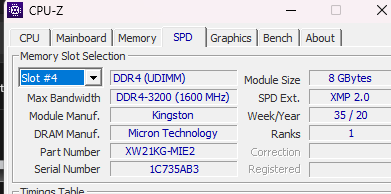
I turned to other diagnosticing tools and noted that my memory consumption was sitting on boot up at 65-75%. I tried turning off a lot of apps at boot up and it barely changed a thing. Having Chrome open sat me at 85% and Marathon was placing me at 90-95%. That sort of memory usage, considering I was juggling so many things on my computer (gaming, school, VS Studio, Docker, an SSH connection, etc) that amount of memory usage didn’t seem sunstainable.
A month ago, I would have looked at purchasing a new computer. This one was five years old, that’s been the pretty standard life cycle I’ve come to expect from computers. Literally, 30 days ago me would have seen this problem and gone “hardware is at fault, replace the hardware” and that would mean the whole damn thing.
RAM
RAM prices are crazy right now. I had to scour the internet for decent-ish pricing for 2 DIMM4 16gb RAM sticks to double my memory capacity in my computer. But $200 is still a fraction of replacing the whole entire computer for something that would still just have 16gb total of memory.
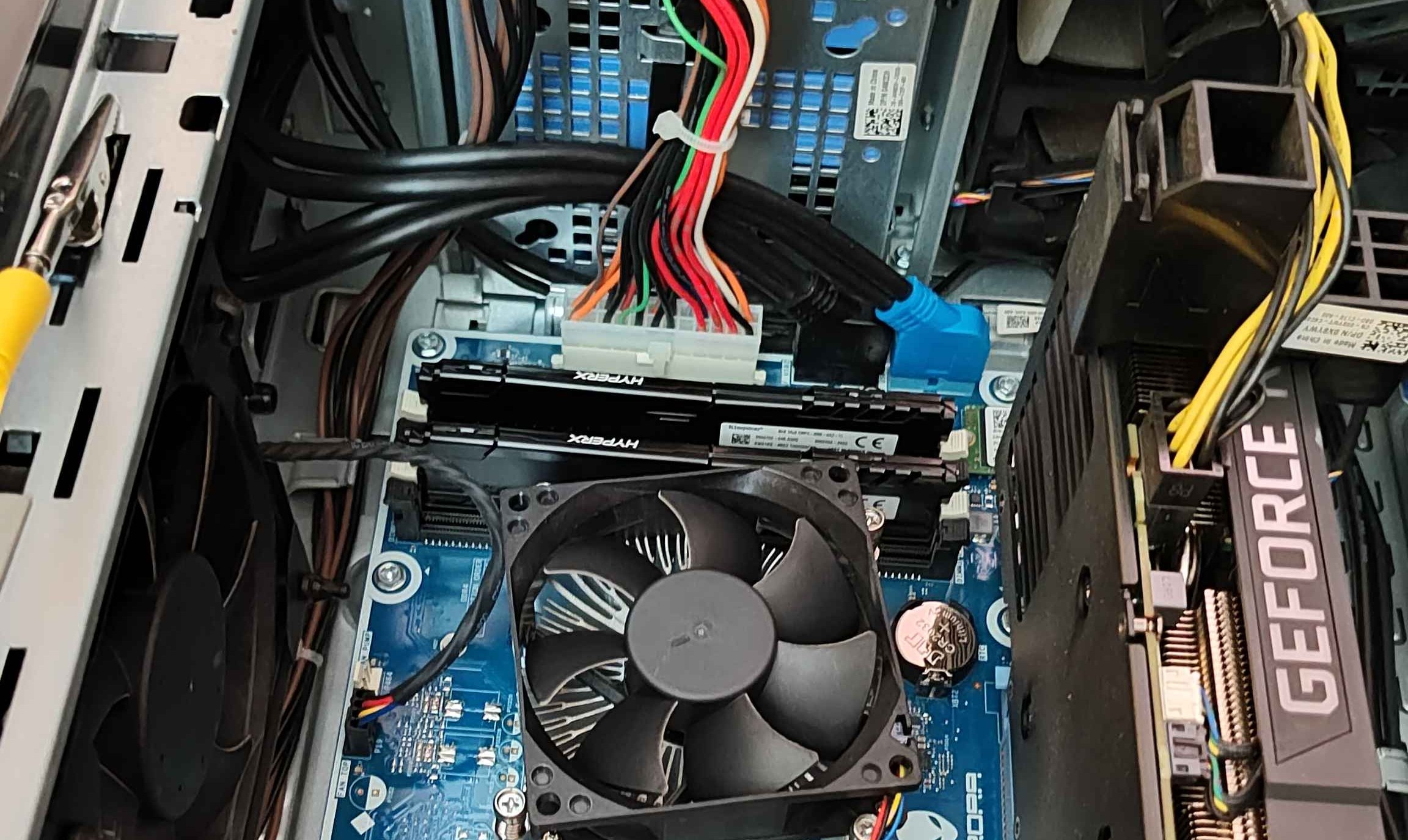
I researched the manual for my computer specs on how to open her up and safely get to the motherboard to replace the RAM. It took a little struggling to figure out the correct alignment of the slot and to trust that I wasn’t breaking something so I could push down on it hard enough for it to finally lock into place. I had some POST issues where my computer didn’t want to recognize the new RAM and because I was on a wireless keyboard, I couldn’t get into BIOS until I found a wired keyboard.
On boot up, memory was at 15%. With Chrome 30%. Booting up a game it went to 42%. Since then, I’ve reintroduced docker and VS Code which requires WSL to be on in the background so my average usage is sitting at around 60%… with all of those things running simultaneously. I think I’ve seen it hit 70% a couple of times but that’s definitely the max. The immediate change really lifted my mood, especially that day because I’d spent the morning demoralized about my illness.
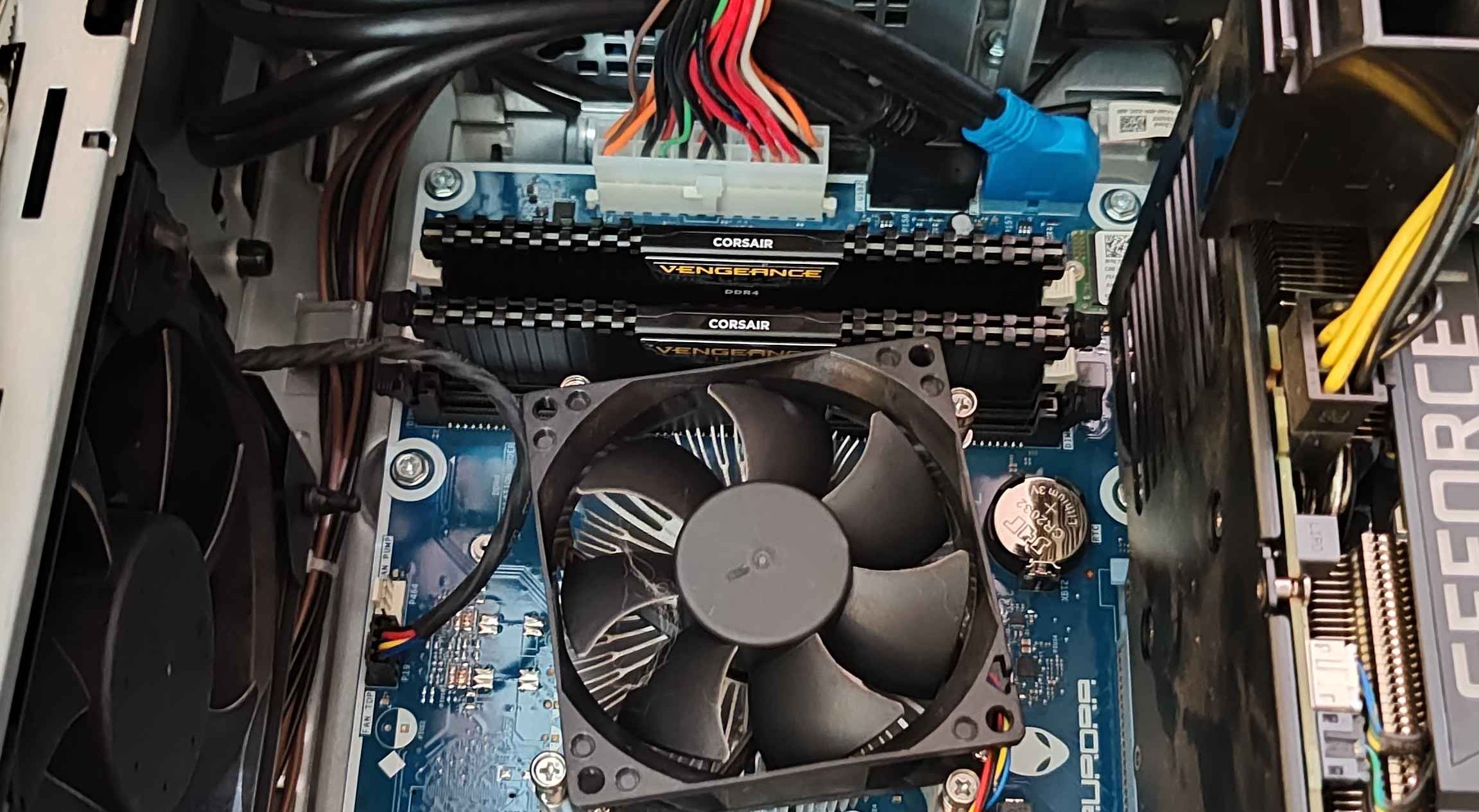
This, however, did not fix the Marathon issues. I suspected it wouldn’t but seeing the 90% memory usage felt like a decent thing to take care of regardless. It also had the good effect of narrowing down what the problem could be.
If it wasn’t storage or memory, nor could it be network or the game itself, there had to be something in between those two levels that was causing the issue. Something I had suspected since the early days of having this computer but I hadn’t known enough to figure it out let alone jump to how to solve it.
I had to change my network card.
Network Card
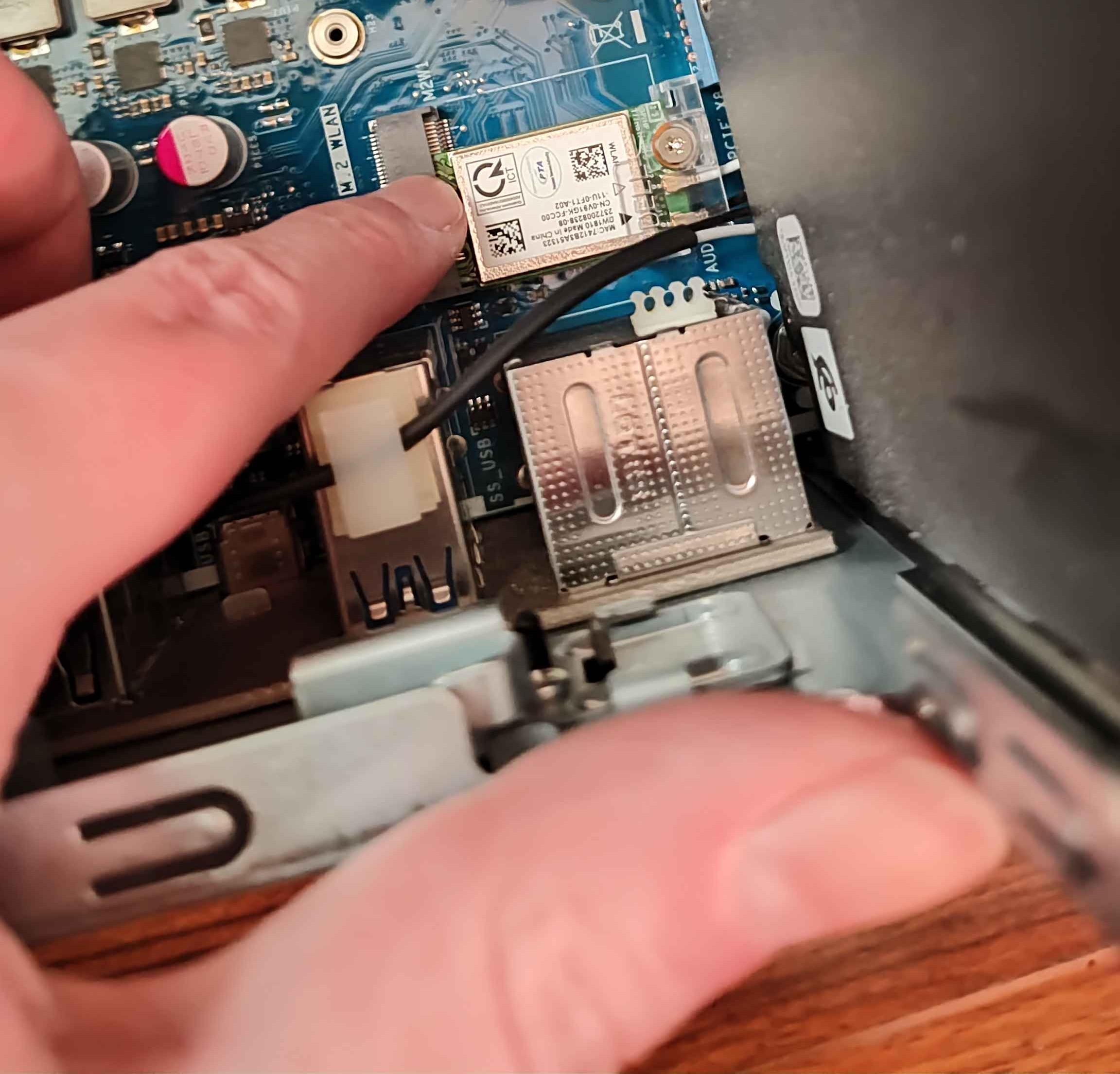
The Qualcomm QCA9377 wireless card is a budget network card that is notoriously finicky at best and an absolute nightmare if you regularly try to online game and don’t understand why you’re having issues that nobody else even on the same network is having. The setting change I’d done about the power earlier had helped improve the upload speeds; they went from around 20-30mbps to 40. But I rarely had download speeds over 60 and sometimes even when the speed tests started to show over 60, the site would freeze or I’d run it again and get something a fraction the speed at like 45.
I was aware of my speed limitations but had always thought they were a router limitation that I couldn’t do anything about because every place I’ve had internet with this computer, the router has been controlled by somebody else.
But clearly more was going wrong than speed, my network card was dropping packets, making me disconnect from online games and making downloading games slow, sometimes ending up with some corrupted files that required reverifying (thus why it was an instinct to do so with Marathon - I’ve been down this road before elsewhere).
For $20 I could not only replace it but upgrade. Better Bluetooth, more reliable connection, and future proofing for 6GHz internet speeds.
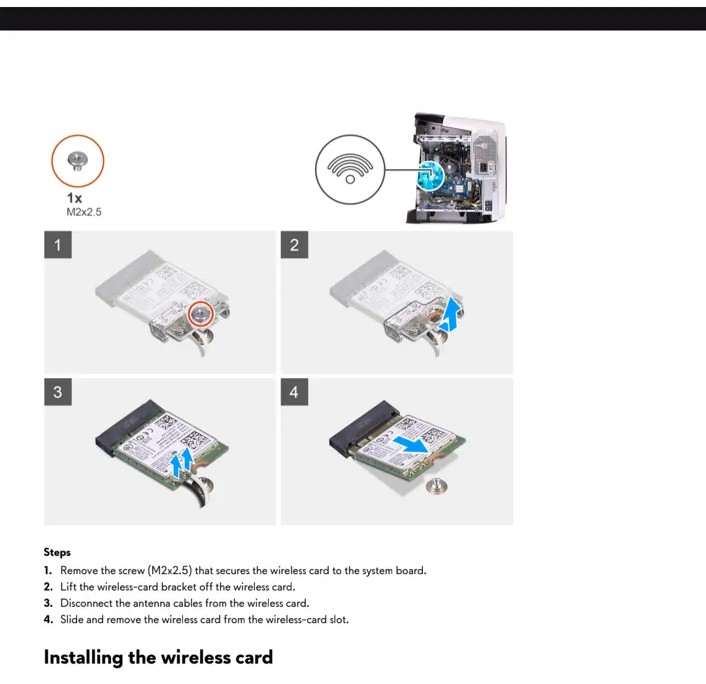
The physical reality of making that change was a little more involved than a couple of DIMM4 RAM sticks.
See the step after opening up the computer to view the motherboard is “remove the GPU to get to the wireless card.”
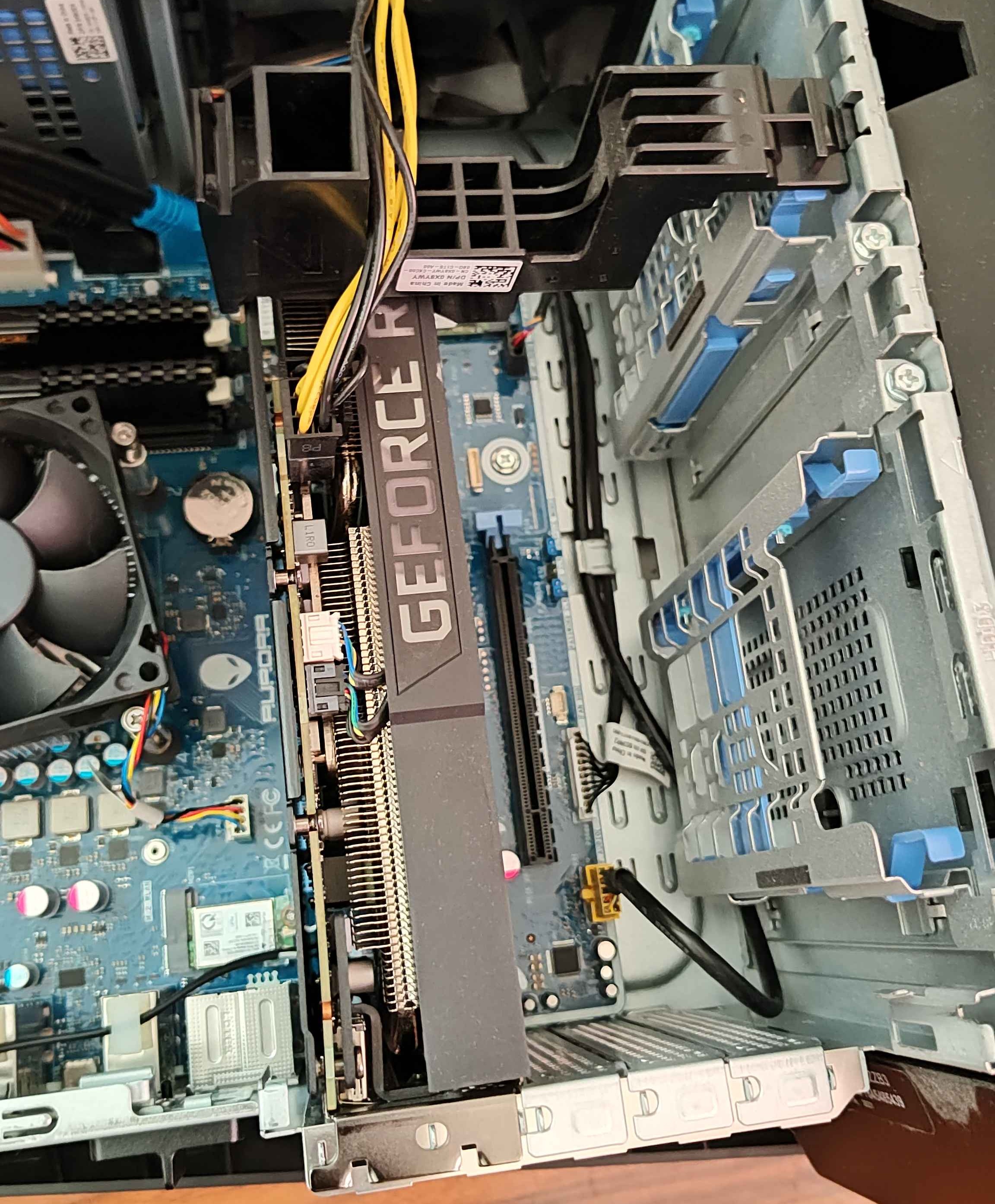
Okay, let’s check the instructions for removing the GPU: “simply unclip the PCIe clip and pull it up and out of the slot.”
Ah. Sure. Typically, opening that clip is pretty simple. The clip in this case? Directly under the center of the GPU mass with the only available piece of the clips not being designed to be pushed by a finger - the available corners are very, very sharp. It also hadn’t been unclipped probably since it was installed over five years ago, so it was pretty married to its position. I was worried about using something to push it that if it slipped and hit sommething else, it would break a piece of the motherboard - the CMOS battery was right there.
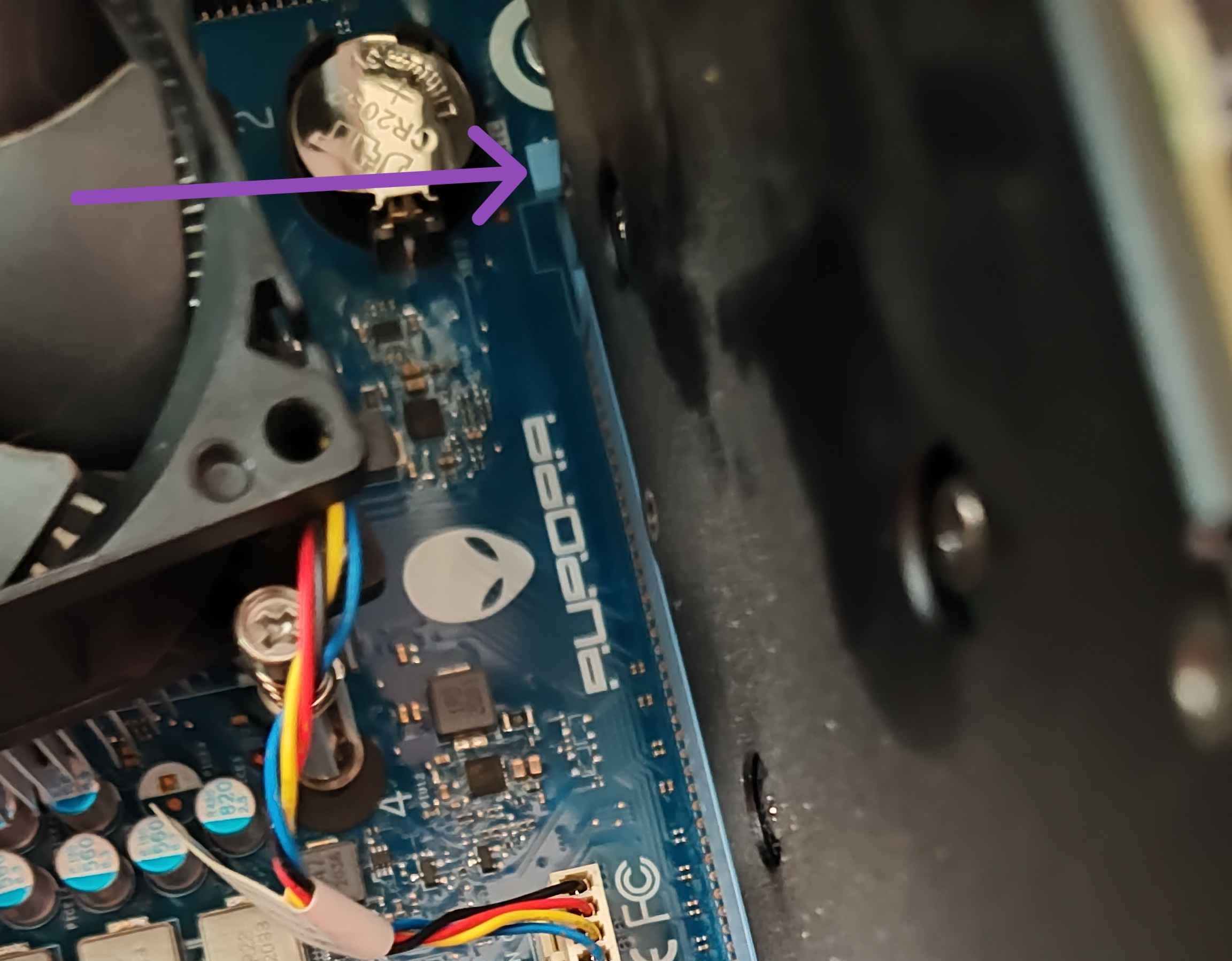
But all advice said pushing it with an object was the only way they got it open. Eventually, I used the butt end of my screwdriver that had a flat surface rather than rounder so it was less likely to slip and it clicked open. A little careful wiggling and the GPU was free and I could turn my attention to the wireless card. No clips there. Just a screw and some antenna wires. Easy peasy.
I had been ill that day. The high of replacing my RAM just a couple days ago was already leaving and the next day my symptoms would be so bad that I would end up skipping class because I just felt that unwell. My body was already weak and shaky and I decided to install my new wireless card under those circumstances because dammit, I’d been dealing with this crappy wireless card for five years!
Those little coaxial antenna wires were the devil. They were a torture designed for me to make me feel useless and stupid and like a failure and that I wasn’t cut out for this at all actually.
I double checked that the new card connection was compatible with the wires – they were. I looked up video after video of how to put them on but only one had wires close to the very low profile tiny connector types I was dealing with. They recommended coming in at an angle, all other advice said straight down was the best, everywhere warned to be careful about not forcing it and ruining the connectors and how the antenna wires were very fragile and you had to not break them.
My hands are getting more shaky as time went on, which certainly wasn’t helping. But if I took a break and walked away, I’d either leave my motherboard exposed to the cat or have to close it all back up again and reopen it when I wanted to try again. I also couldn’t, just, put the old one back in and try a different day entirely now that I had gotten this far - I’d just have the same struggle with the wires on the old one.
I kept trying. Different angles, different positions. I tried screwing down the card first temporarily so it would be flat when I attached the cables. I tried using a different item to press down on the coaxial heads to push it into connection.
Finally, I unclipped the wires and stretched their full length (carefully) away from the computer to bring it all closer to me, rather than me leaning over to it. After 30 minutes, the first connection snapped into place. I cheered to an empty room.
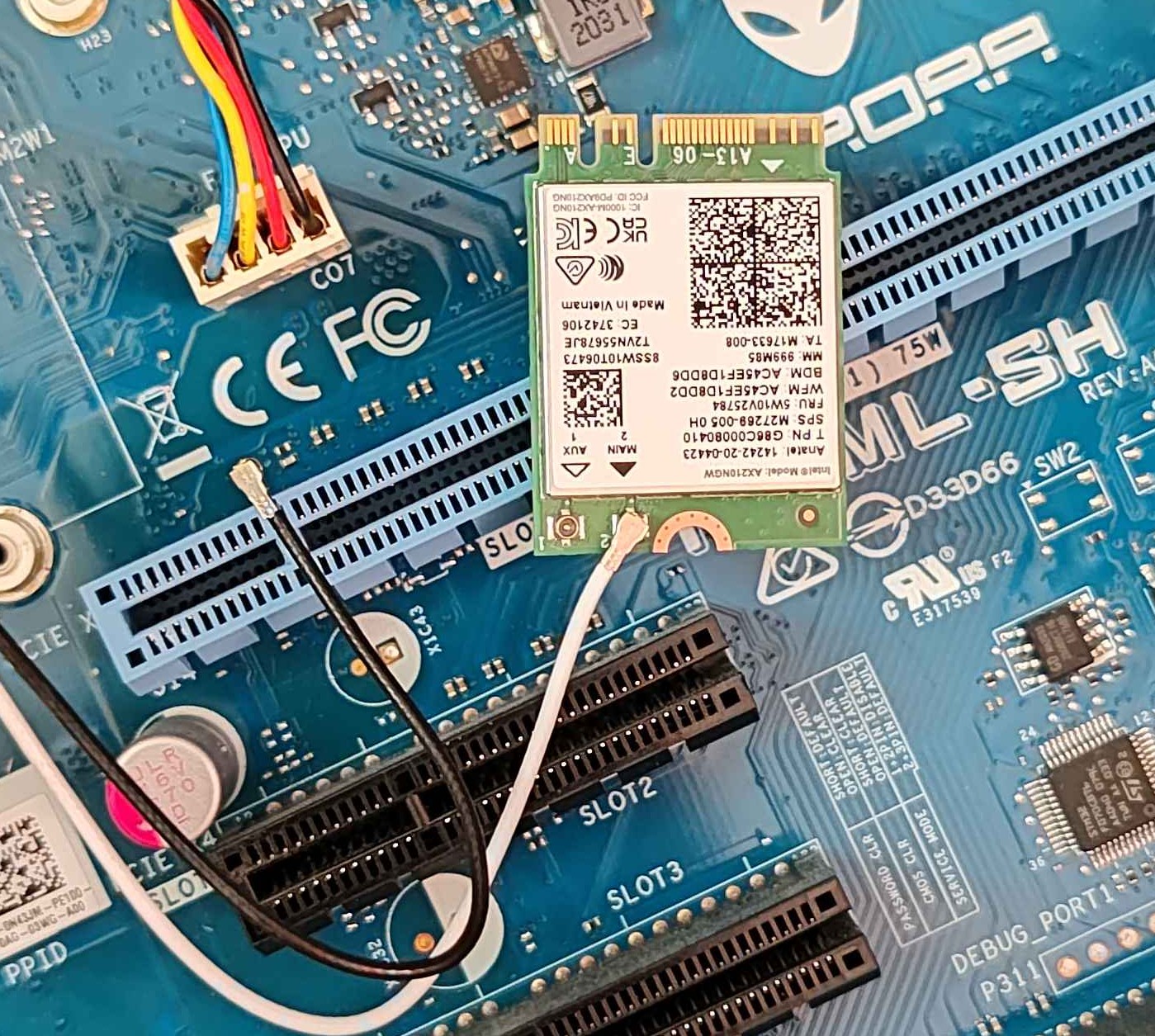
Now I knew it could be done. I had experienced it happening so I knew the signs to look for when it was going right so it was easier to dismiss when it wasn’t going right. The next snapped on within five minutes of the first.
I very quickly got the card into the M.2 slot, reinstalled the GPU, did a once over comparison between the interior off the computer and my photos… realized I had forgotten to put something back (this is why we take photos!), got it locked up, plugged in and booted.
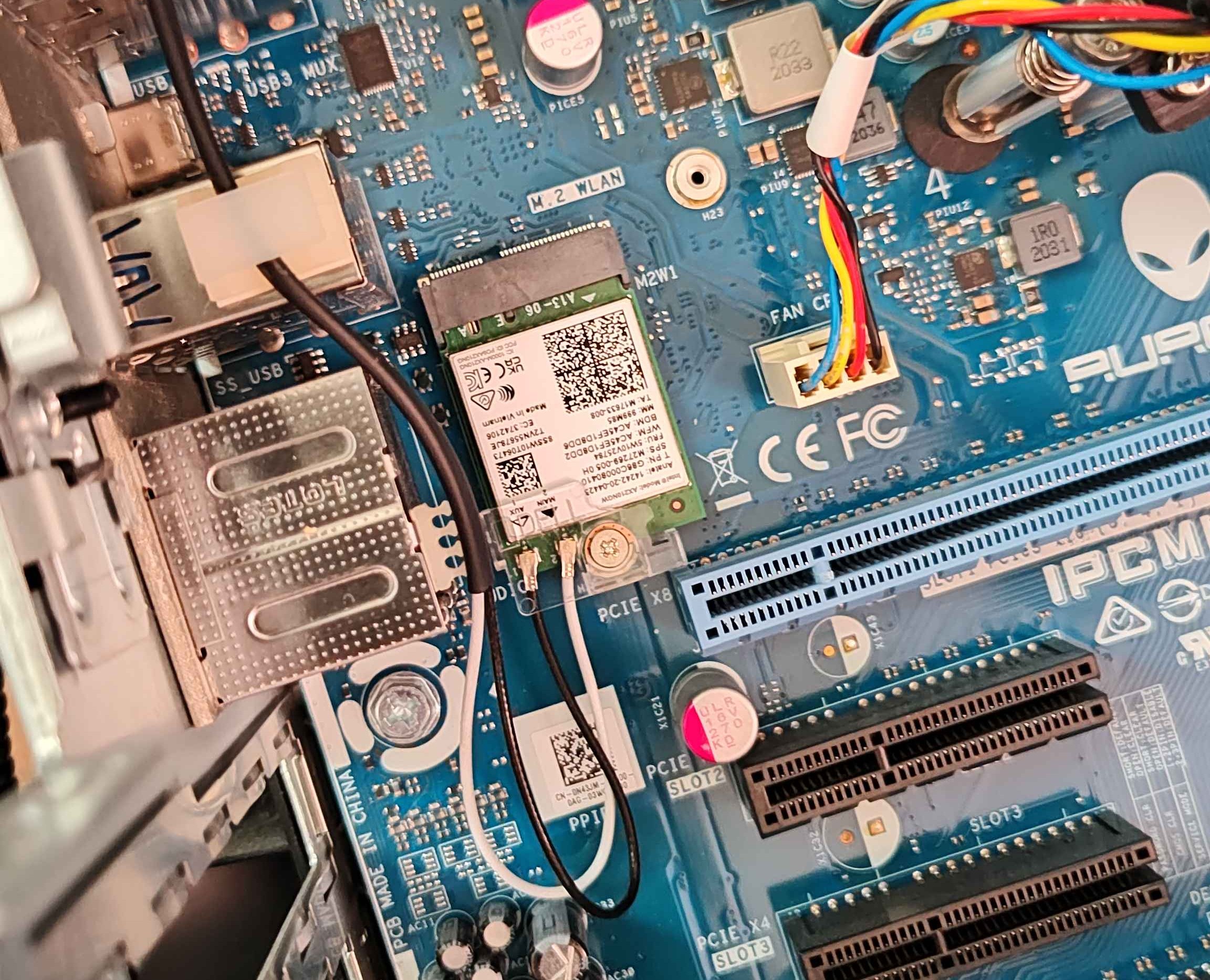
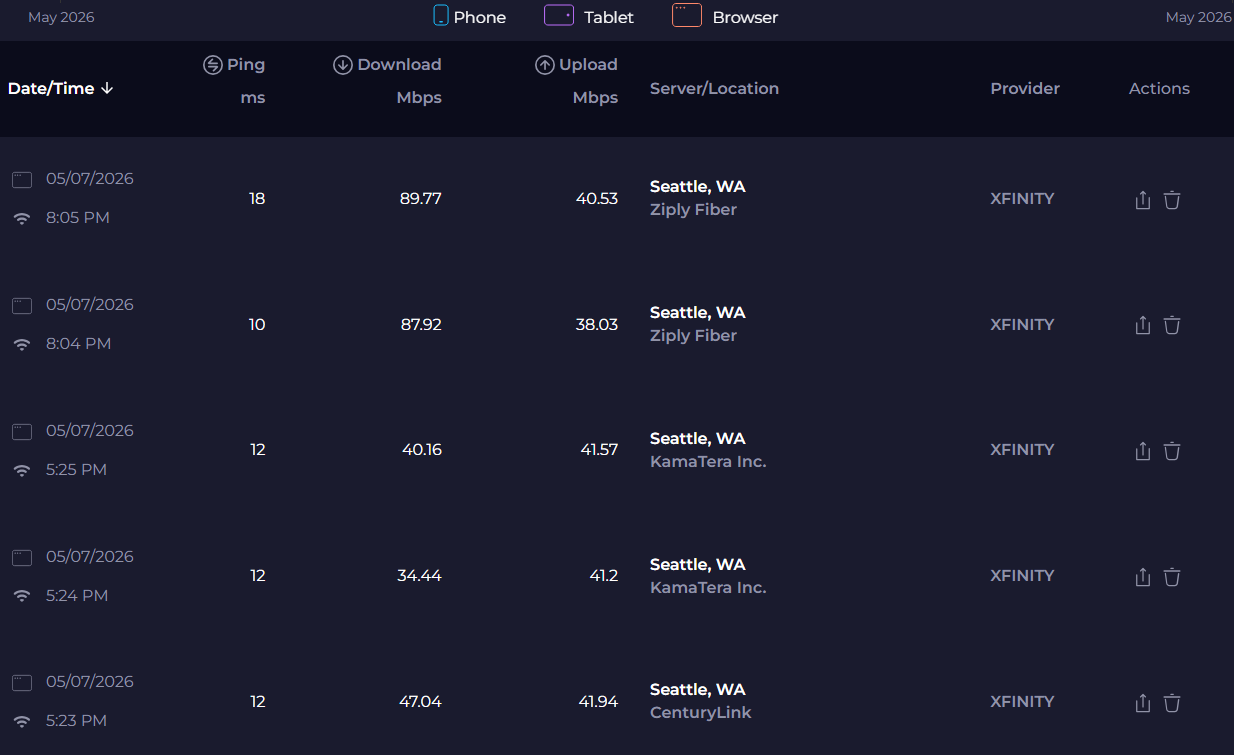
Night and day. I went from 37-42 download speeds at 5:30pm when most people are stuck in traffic so network congestion is lower to 87-90 download speeds at 8:30pm when far more people are engaged in Netflix, internet phone calls, YouTube tutorials, TikToks, and more.
Marathon booted and signed in first try. I closed it and started again. It did it again. I closed it and tried one more time… and yeah, not a fluke. No error messages. No stuttering. No slowdown. Just exactly what is expected of the application with normal use.
I downloaded a patch for Slay the Spire 2 beta and it was even more blink and I’d miss it. The network line on the Steam download page was a mostly flat plateau rather than dipping and disappearing constantly.
I’d had this problem I’d been living with for the entire life of this computer, something that only got worse and worse as time went on and the card got older and more outdated. A younger version of me would have chucked the entire computer. That younger version can be counted in days and weeks, not years.
Of course I’m not going light speed right now, it’s only been one and a half quarters of learning. But god damn, 100mph is still pretty fast especially in a school zone (metaphorically - never ever speed in a school zone literally, sheesh).
Reflection
Network+ is still kicking my ass and making me cry. I spent yesterday doing another fractions weekend study session just to pass one checkpoint review quiz. I just barely made it under the wire with the needed 80%. There are two sections after it that I should have completed that day because that’s the week they were on the schedule for. They now have to live in the new schedule on the new week alongside all the other things on the to do list.
I still also have a list of like fifty things from that study session that I just could not dig into yesterday and have flagged to come back to. I honestly had scheduled myself to be doing that reading during the hours I’ve spent writing this blog post, so in my head I’m further behind than I was this morning.
But I think I also needed this reality check. To take the time to unload and reflect and whine that it’s unfair but also gas myself up because holy crap I did that – for the fraction of the price of a brand new computer, I upgraded mine to be slightly better than most standard gaming PCs on the market. I extended the lifespan of a mid PC all by myself, with my own two hands, and I understand why what I did improved it.
Plus, I need to remind myself that time away from the subject matter and studying is just as important as the time invested in studying. The brain isn’t going to move things from it’s short term RAM into the long term storage unless it gets breaks, food, water, and sleep. A lot of that has been impacted by my illness, so of course some of the material I feel like I covered and should know didn’t actually stick with me. But that makes it more important than ever to ensure my brain’s power cycle finishes every step.
I stopped reading my Network+ material when I hit these sentences
1
2
3
When it is used with the HTTP application, it is referred to as HTTP Secure (HTTPS).
TLS can also be used to secure other TCP application protocols,
such as DNS, NTP, FTP, POP3/IMAP, SMTP, and LDAP.
I had to laugh about it. Like certainly I still have the frustration about acronyms that I’ve always had (I have dyslexia, so NTP and FTP can look the exact same if I’m not careful or I’ll get IMAP confused with PAM because they read the same in my brain) but it almost felt like the module purposefully created this sentence to illustrate the exact thing I’d been raging about yesterday. I felt like I had stumbled into a cheeky joke between me and the material.
Especially since, off the top of my head, I’m only unsure on what NTP, FTP, and LDAP are. And all I have to do is go to the next page to learn about them anyways!
So I’m doing okay. I have to remember that.
Epilogue
After writing the majority of this post, went and worked on some of Network+ using Abuddy to track my progress. The first two sections of the module were the ones I wanted to get done yesterday, but otherwise all of this is what I had on my to do list for today.
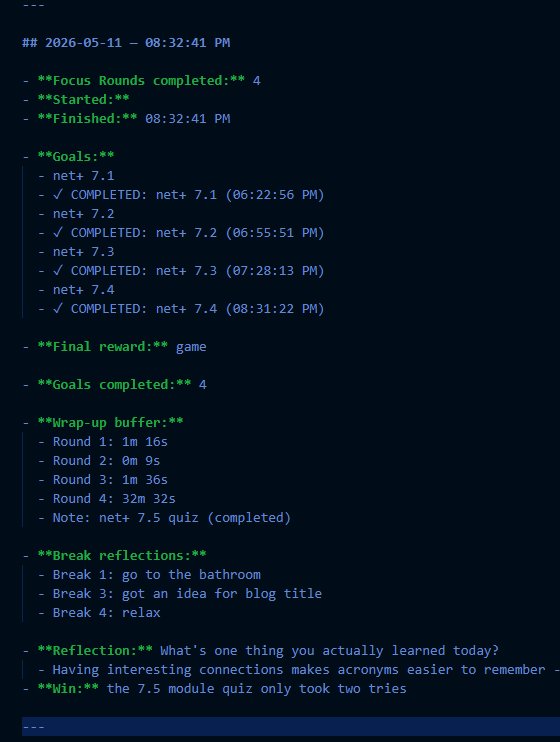
I also found this module much easier than any before. Part of that is that I spent so much time yesterday learning Port Numbers and part of it is that some of the concepts were just easier to deal with conceptually. But either way, moral of the story is don’t give up.
Things really can turn around after the hardest part.